Simple Time Life Planner
เว็บสร้างตารางจัดเวลาชีวิตอย่างง่าย
Vue.js HTML5 CSS3 LocalStorage Responsive Design
Overview
Web Application สำหรับช่วยจัดตารางเวลาในชีวิตประจำวัน เพื่อให้ผู้ใช้งานมองเห็นแผนงานของตนเองในแต่ละวันได้อย่างเป็นระบบ พัฒนาโดยเน้นความเรียบง่ายและใช้งานได้ทันที (Interactive) รองรับการแสดงผลทุกหน้าจอ (Responsive) และระบบบันทึกข้อมูลอัตโนมัติ
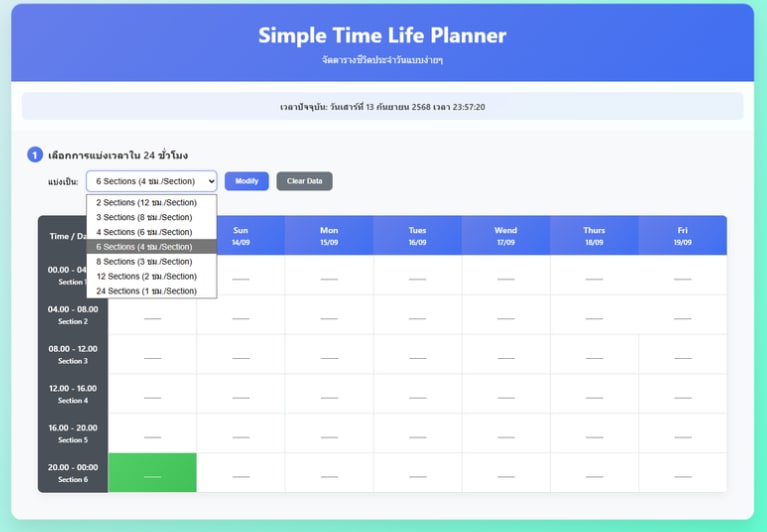
Overview of Simple Time Life Planner
System Architecture & Logic
พัฒนาด้วย Vue.js (CDN) เพื่อการประมวลผลฝั่ง Client-side ที่รวดเร็ว โดยไม่มีการใช้ Database ฝั่ง Server แต่เลือกใช้ 'LocalStorage' ของ Browser ในการบันทึกข้อมูลตารางเวลา ทำให้ข้อมูลยังคงอยู่แม้จะปิดหน้าเว็บไปแล้ว และมีความเป็นส่วนตัวสูง
# Source Code
<!DOCTYPE html>
<html lang="th">
<head>
    <meta charset="UTF-8">
    <meta name="viewport" content="width=device-width, initial-scale=1.0">
    <title>Simple Time Life Planner</title>
    <script src="https://cdnjs.cloudflare.com/ajax/libs/vue/3.3.4/vue.global.prod.min.js"></script>
    <style>
        /* CSS Styles ... */
        * { margin: 0; padding: 0; box-sizing: border-box; }
        body {
            font-family: 'Segoe UI', Tahoma, Geneva, Verdana, sans-serif;
            background: linear-gradient(135deg, #eaecf7 0%, #51ffcb 100%);
            min-height: 100vh; padding: 20px;
        }
        /* ... (styles continues) ... */
    </style>
</head>
<body>
    <div id="app">
        <div class="container">
            <div class="header">
                <h1>Simple Time Life Planner</h1>
                <p>จัดตารางชีวิตประจำวันแบบง่ายๆ</p>
            </div>

            <div class="current-time-info">
                เวลาปัจจุบัน: {{ currentTimeString }}
            </div>

            <div class="step-container">
                <div class="step">
                    <div class="step-title">
                        <div class="step-number">1</div>
                        เลือกการแบ่งเวลาใน 24 ชั่วโมง
                    </div>
                    <div class="step-content">
                        <div class="form-group">
                            <label>แบ่งเป็น:</label>
                            <select v-model="selectedSections">
                                <option value="2">2 Sections (12 ชม./Section)</option>
                                <option value="3">3 Sections (8 ชม./Section)</option>
                                <option value="8">8 Sections (3 ชม./Section)</option>
                                </select>
                            <button class="btn" @click="generateSchedule">Modify</button>
                            <button class="btn" @click="clearAll" style="background: #6c757d;">Clear Data</button>
                        </div>
                    </div>
                </div>
            </div>

            <div class="schedule-container" v-if="sections.length > 0">
                <table class="schedule-table">
                    </table>
            </div>
    </div>

    <script>
        const { createApp } = Vue;
        createApp({
            data() {
                return {
                    currentTime: new Date(),
                    selectedSections: 8,
                    sections: [],
                    schedule: {},
                    days: []
                }
            },
            computed: {
                currentTimeString() { /* Logic */ },
                hoursPerSection() { return 24 / this.selectedSections; }
            },
            methods: {
                generateSchedule() { /* Logic */ },
                saveToStorage() {
                    const data = {
                        schedule: this.schedule,
                        selectedSections: this.selectedSections,
                        lastUpdated: new Date().toISOString()
                    };
                    localStorage.setItem('simpleTimeSchedule', JSON.stringify(data));
                },
                loadFromStorage() {
                    const saved = localStorage.getItem('simpleTimeSchedule');
                    if (saved) {
                        const data = JSON.parse(saved);
                        this.schedule = data.schedule || {};
                    }
                }
            },
            mounted() {
                setInterval(this.updateCurrentTime, 1000);
                const saved = localStorage.getItem('simpleTimeSchedule');
                if (saved) {
                    const data = JSON.parse(saved);
                    this.selectedSections = data.selectedSections || 8;
                }
                this.generateSchedule();
            }
        }).mount('#app');
    </script>
</body>
</html>